


You want a laptop that keeps pace with your work, creativity, and daily life without compromises. Modern laptops now blend fast processors, efficient power use, smarter local AI, and robust security so you can run demanding apps, stay productive on the go, and protect your data.
Choose a laptop with the right mix of CPU/GPU performance, battery efficiency, fast storage, and built-in security features to turn it into a reliable, future-ready computing solution.
This article will walk you through how specifications have evolved, which features matter most for performance and connectivity, and what to watch for in coming years so you can pick a device that truly fits your needs.
Evolution of Laptop Specifications
You will see how laptop parts moved from bulky, slow components to compact, high-performance systems focused on battery life, connectivity, and user experience. The following subsections detail the hardware timeline, processor breakthroughs, and GPU advances that most affect your purchase and use today.
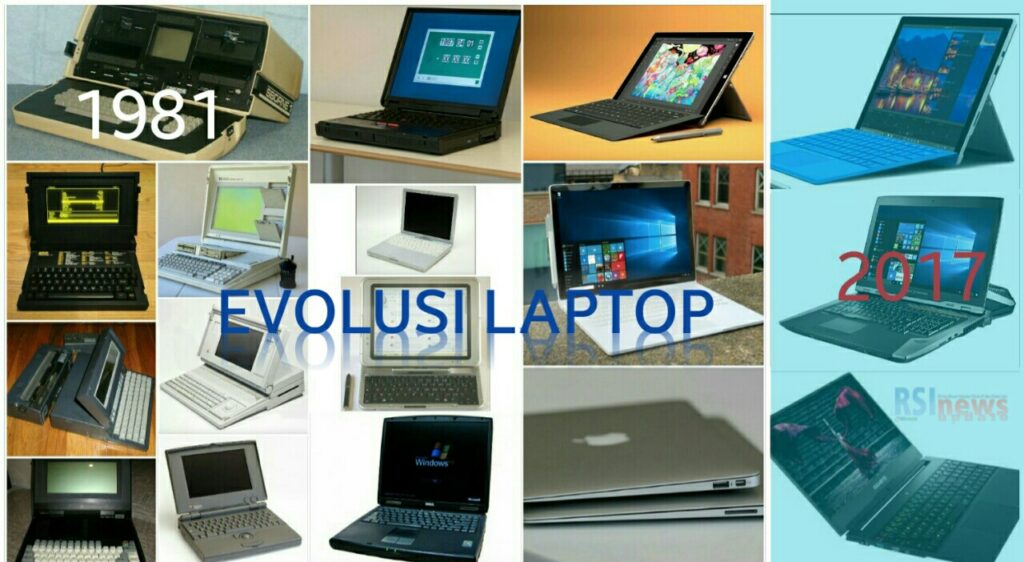
Historical Progress of Laptop Hardware
Early portable computers in the 1980s prioritized portability over performance, using heavy chassis and limited battery cells. By the 1990s, manufacturers introduced lighter plastics, more efficient NiMH then Li-ion batteries, and clamshell designs that established the modern laptop form factor.
From the 2000s onward, miniaturization and power efficiency drove change. Solid-state drives replaced mechanical HDDs for faster boot and lower power draw. Displays moved from CCFL to LED backlights, reducing thickness and improving brightness. You also saw the rise of thin-and-light and 2-in-1 convertible designs, where hinge engineering and touchscreen digitizers became selling points.
Service ecosystems and firmware updates grew into purchase factors. You now consider repairability, update cadence, and vendor support alongside raw specs. These choices directly shape battery life, thermals, and long-term value.
Milestones in Processor Development
Processor evolution shifted the balance between raw clock speed and efficiency. Early laptop CPUs were downclocked desktop chips; you suffered high heat and poor battery life. Intel’s shift to mobile-focused architectures (Pentium M, Core series) emphasized per-watt performance and transformed battery longevity.
The last decade added multicore designs and aggressive power gating. ARM-based laptop SoCs (e.g., Apple M-series) introduced SoC integration with unified memory and high single-thread performance per watt, giving you laptop-class battery life with desktop-level responsiveness. AMD’s Ryzen mobile chips closed the gap by offering more cores and better integrated graphics for mainstream laptops.
When you evaluate CPUs, compare core/thread counts, base and boost frequencies, IPC metrics, and TDP. Also check platform features like LPDDR support, PCIe lanes, and built-in AI accelerators that affect real-world application performance.
Advancements in Graphics Technology
Integrated graphics evolved from basic 2D accelerators to capable 3D renderers. Early integrated GPUs handled only video playback and simple GUIs. Modern integrated solutions (Intel Iris Xe, AMD Vega/Radeon iGPU, Apple GPU cores) support light gaming, GPU-accelerated rendering, and hardware video encoding/decoding.
Discrete mobile GPUs progressed through generation leaps in shader units, memory bandwidth, and power-efficient architectures. NVIDIA’s Max-Q designs and AMD’s optimized mobile chips balance performance and thermal limits so you get higher sustained frame rates without excessive heat.
When choosing a laptop for visuals, look at GPU architecture, VRAM type/amount (GDDR6 vs. LPDDR), TGP/TDP ratings, and software driver support. For content creation, prioritize GPU compute features (CUDA/OpenCL/Metal) and hardware encoders; for gaming, prioritize sustained boost and cooling design.
Key Features of Modern Laptops
You need a laptop that balances raw performance, clear visuals, fast storage, and reliable cooling. These elements determine real-world responsiveness for work, creative tasks, and daily mobility.
Cutting-Edge Processors
Choose processors that match your workload: Intel Core (13th–15th gen and later) and AMD Ryzen 7000–series and newer offer strong multi-core performance for multitasking and content creation. Look for hybrid architectures (performance + efficiency cores) to keep short bursts fast while conserving battery during light tasks.
Pay attention to core/thread counts, base and boost frequencies, and supported instruction sets (AVX, AI inference accelerators). For AI-enhanced apps, on-die neural engines or dedicated NPU blocks significantly speed up local inference compared with CPU-only execution.
Also check platform features: PCIe lane count for GPUs and NVMe, memory channels supported (dual/quad), and power limits (PL1/PL2) that affect sustained performance.
High-Resolution Displays
Pick a panel that matches your work: 1440p (QHD) balances clarity and battery life; 4K suits photo and video editing where pixel-level accuracy matters. Prioritize IPS or OLED for wide color gamut and consistent viewing angles.
Look for key specs: color coverage (sRGB/Adobe RGB/DCI-P3), Delta E figures for color accuracy, peak brightness (nits) for outdoor use, and refresh rate (60–120Hz+) if you do motion-sensitive work or light gaming. HDR support and local dimming improve contrast on compatible content.
Consider matte vs glossy finishes and factory calibration options if color-critical output matters to you.
Advanced Storage Options
NVMe SSDs provide the biggest real-world boost. Choose PCIe 4.0 or 5.0 NVMe SSDs for sequential throughput (2,000–7,000+ MB/s depending on generation), which speeds large file transfers and app load times. For databases and heavy I/O, prioritize high IOPS and sustained write endurance (TBW).
Check drive configurations: single NVMe for slim laptops, dual NVMe or NVMe+SATA combos for expandability and RAID setups. Some models offer user-replaceable M.2 slots and an extra 2.5″ bay.
Also weigh capacity needs: 1TB is a common sweet spot; 2TB+ suits multimedia professionals. Encryption support (hardware AES) and secure erase features add data protection.
Efficient Thermal Management
Thermal design dictates how long your CPU/GPU can sustain peak performance. Look for laptops with multi-heatpipe arrays, vapor chambers, and large fin stacks to move heat away from components efficiently.
Fan design and airflow paths matter: intake grilles, exhaust placement, and keyboard/hinge airflow affect cooling and surface temperatures. Manufacturers that expose TDP or configurable power profiles allow you to tune performance vs. noise.
Also consider chassis materials—aluminum conducts heat better than plastic—and serviceability for cleaning fans and reapplying thermal paste to maintain performance over years.
Performance as a Computing Solution
You need a laptop that handles heavy apps, lasts through long workdays, and stays easy to carry. The next paragraphs focus on processor and GPU choices, real-world battery strategies, and design trade-offs that affect portability.
Multitasking Capabilities
Choose a CPU with at least 6–8 high-performance cores if you run virtual machines, data analysis, or multiple IDEs and browser windows simultaneously. Prioritize modern architectures (e.g., Intel Core Ultra series, AMD Ryzen 7000/8000 mobile families, or Apple M-series) that offer efficient single-thread performance plus strong multithread scaling.
RAM matters as much as the CPU. Aim for 16 GB as a baseline for productivity; 32 GB or more for heavy content creation, large datasets, or VM usage. Fast RAM (higher frequency, tighter timings) and dual-channel configurations improve responsiveness.
Also evaluate the GPU when your workflows include GPU-accelerated tasks (machine learning inference, GPU rendering, or video encoding). Dedicated mobile GPUs or integrated accelerators with dedicated AI cores reduce CPU load and speed up parallel workloads. Check thermal design: sustained performance depends on cooling, not just peak specs.
Battery Life Optimization
Focus on capacity (Wh) and platform efficiency. A 60–80 Wh battery paired with low-power silicon (chipsets built on 5nm/4nm processes) typically gives the best balance for all-day use under mixed workloads. Manufacturers’ rated battery life often assumes light web tasks; real-world runtime drops when you use heavy CPU/GPU tasks.
Use power profiles and adaptive boost controls to extend runtime. Set CPU limits, reduce display brightness, and enable variable refresh rates or panel dimming. Hardware features like dedicated low-power display controllers or hardware video encode/decode blocks greatly lower energy use during streaming or conferencing.
For heavy mobile workflows, consider fast-charging support (50% in ~30 minutes) and replaceable batteries where available. Track battery health: high cycle counts and sustained high discharge rates accelerate capacity loss, so avoid keeping the battery at 100% constantly.
Portability and Design Innovations
Evaluate chassis materials and weight against thermal needs. Magnesium‑alloy or carbon-fiber lids keep weight under ~1.2–1.5 kg for ultraportables, while aluminum or thicker magnesium enables better cooling for 1.8–2.5 kg performance laptops. Pick based on whether you prioritize daily carry or sustained performance.
Look for I/O that matches your workflow: Thunderbolt/USB4 for external GPUs and fast storage, HDMI 2.1 for high-refresh external monitors, and SD Express for photographers. Detachable or 360° hinge designs add flexibility but can introduce thermal and structural compromises.
Display choices affect ergonomics and battery: 120–165 Hz panels suit creators and gamers; 60–90 Hz OLED or high-brightness IPS panels favor color accuracy and outdoor visibility while balancing power draw. Also inspect keyboard travel, trackpad size, and port placement—small design details that shape your daily efficiency.
Connectivity and Expansion
This section explains how modern laptops connect to networks and peripherals, and what expansion options you should expect for reliable, high-performance workflows.
Wireless Communication Technologies
You need Wi‑Fi 6E or Wi‑Fi 7 on a high-end laptop for consistent multi‑device throughput and low latency. Wi‑Fi 6E adds access to the 6 GHz band, reducing congestion in crowded environments; Wi‑Fi 7 increases channel widths and multi‑link operation for higher sustained transfer rates—useful for large file syncs and cloud backups.
Bluetooth 5.3 (or later) gives you stronger device pairing, lower power for audio, and better audio quality with LE Audio support. For mobile professionals, integrated 5G/4G LTE modems provide carrier‑grade connectivity when Wi‑Fi is unavailable; check supported bands and eSIM capability. Also verify driver support and vendor‑supplied firmware updates to maintain security and performance.
Diverse Port Selection
You should expect at least two Thunderbolt 4/USB4 ports for external GPUs, high‑res displays, and fast NVMe docks. Thunderbolt 4 guarantees 40 Gbps, PCIe tunneling for storage, and power delivery; it simplifies a single‑cable workstation setup.
Include a full‑size HDMI 2.1 (or 2.0 at minimum) for direct 4K/120Hz or multi‑monitor connections without adapters. A USB‑A 3.2 port helps with legacy peripherals. If you work with cameras or SD cards, a UHS‑II SD slot speeds media offload. Ethernet (1 GbE or 2.5 GbE) remains important for stable transfers in offices; if your model lacks a port, plan for a Thunderbolt dock.
Security Enhancements in Laptops
Modern laptops embed hardware and software controls to stop physical theft, unauthorized access, and data leakage. Expect integrated biometric sensors, hardware encryption engines, secure boot chains, and firmware protections that work together to protect your credentials and stored data.
Biometric Authentication
Biometric systems on laptops typically include fingerprint readers and IR facial cameras that tie login to physical characteristics. Fingerprint sensors now use capacitive or optical scanners with anti-spoofing algorithms; they unlock the device, authenticate payments, and gate password managers. IR cameras support Windows Hello-style facial recognition and function in low light; they rely on depth-sensing or active IR to reduce false accepts.
You should check for TPM-backed biometric enrollment so templates never leave the secure element. Look for FIDO2/WebAuthn support to use biometrics for web logins without transmitting passwords. Enterprise models often add smartcard readers or removable security tokens for multi-factor authentication.
Data Protection Features
Laptops increasingly include hardware TPM chips, NVMe drives with AES-GCM encryption support, and BIOS/UEFI secure boot to ensure system integrity. TPM (2.0) stores keys and enables BitLocker or other full-disk encryption without exposing keys to the OS. Hardware-accelerated AES in modern CPUs speeds up full-disk and container encryption with minimal performance impact.
You should prioritize models with soldered or self-encrypting drives (SED) for tablet-grade protection and with firmware-based rollbacks blocked to prevent persistent malware. Additional protections to consider: discrete security modules (e.g., Intel TME, AMD SME/SEV), BIOS passwords with measured boot, and firmware vulnerability patching policies from the vendor.
Impact on Productivity and Everyday Use
Modern laptop specs directly affect how quickly you finish tasks, how long your device runs unplugged, and whether specialized apps behave smoothly. Expect measurable gains from faster CPUs, more RAM, NVMe storage, and AI-capable accelerators in typical daily workflows.
Remote Work Solutions
When you work remotely, CPU single-thread speed and battery life matter for video calls and document work. Choose a laptop with at least a quad-core U-series or equivalent CPU, 16 GB RAM for browser tabs and virtual meetings, and NVMe SSD for fast profile loading.
A 1080p or better webcam plus dual-array microphones improve meeting clarity; hardware-based noise suppression (or an NPU that runs noise-reduction models) reduces background interruptions. Prioritize Wi‑Fi 6E or Wi‑Fi 7 and Bluetooth 5.3 for stable connectivity to routers and peripherals.
If you travel between home and coworking spaces, consider a compact 14″ or 13.6″ chassis that balances thermal headroom and portability. Look for 60–90 Wh batteries and fast charging that returns 50% in ~30 minutes. Docking support (Thunderbolt 4 or USB4) lets you connect multiple monitors and Ethernet without repeated cable swaps.
Educational Benefits
For students, responsiveness during note-taking, coding, and research is crucial. Aim for 8–16 GB RAM for general coursework; 32 GB if you run virtual machines, large datasets, or heavy IDEs. A fast NVMe drive shortens app launch and compilation times, helping you iterate faster on assignments.
Touchscreens and pen support benefit design, math notation, and annotation-heavy study; look for low-latency active stylus compatibility and a display with at least 100% sRGB for color-accurate materials.
Battery life and weight affect all-day campus use. Select a machine that sustains 8+ hours under mixed usage and weighs under 1.5–1.7 kg if you carry it daily. Affordable models with recent-generation CPUs still deliver satisfactory performance for most majors without excessive cost.
Creative Industry Applications
In creative work—video editing, 3D, and audio production—GPU capability and thermal design define throughput. Pick laptops with discrete GPUs (NVIDIA RTX-series or AMD equivalents) and at least 6–8 GB of VRAM for real-time previewing of high-resolution timelines. More VRAM and CUDA/OptiX acceleration speed up render and export tasks.
High-core-count CPUs (6–12 cores) reduce export times for multi-layer projects. Fast NVMe storage and scratch drives lower cache stalls; consider RAID or external Thunderbolt 4 storage when working with many large files. Color-accurate displays (DCI-P3 coverage, 10-bit panels where possible) and calibrated workflows preserve final output fidelity.
Future Trends in Laptop Development
Expect materials and system intelligence to shape portability, durability, and daily workflows. Key shifts will affect battery lifespan, repairability, and how quickly your device completes creative and productivity tasks.
Sustainable Material Innovations
You’ll see more laptops using recycled aluminum, post-consumer plastics, and biobased polymers for chassis and internal mounts. Manufacturers increasingly report percentages for recycled content; prioritize models that list >50% recycled aluminum or certified plastics to reduce embodied carbon.
Design choices aim to improve repairability and longevity. Look for modular components (user-replaceable SSDs, batteries, and keyboards), standardized screws, and accessible repair guides or spare-part programs. Those features keep devices in service longer and lower total ownership cost.
Manufacturers also optimize finishes and coatings to avoid toxic flame-retardants and to enable easier disassembly. Certifications to watch: EPEAT Gold, TCO Certified, and EU Ecodesign compliance — they signal stronger sustainability practices.
AI-Powered Laptop Capabilities
AI now runs on-device for features like real-time noise suppression, instant photo upscaling, and background task offloading. Choose laptops with dedicated Neural Processing Units (NPUs) or newer integrated accelerators; they deliver faster local inference and lower battery draw than cloud-only solutions.
Practical benefits include faster content generation (quick image variants, short video edits), adaptive power management that extends battery life by predicting your workload, and system-level privacy by keeping sensitive inferences on your device. Check benchmarks for on-device AI throughput (TOPS) and software ecosystems (SDKs, frameworks) that support third-party apps.
Security and update policies matter. Prefer vendors that provide firmware-level AI model updates and clear data-handling documentation so you control model training data and can apply security patches promptly.
Conclusion
You now see how modern laptops balance performance, efficiency, and portability to meet diverse computing needs. Choose components that match your workflow rather than the highest specs alone.
AI features, energy-efficient chips, and fast storage improve real-world responsiveness. These advances let you run creative apps, multitask, and game with fewer compromises.
Prioritize battery life and thermals if you work mobile; prioritize GPU and display fidelity for content creation. Security and compatibility matter for long-term reliability and productivity.
Use the checklist below to guide purchases and upgrades:
- CPU: pick according to tasks (multi-core for heavy workloads, efficient cores for mobility).
- GPU: integrated for light work, discrete for gaming/creative apps.
- Storage & RAM: prioritize NVMe SSDs and 16GB+ RAM for smooth multitasking.
- Battery & cooling: verify endurance and sustained performance.
- AI & connectivity: prefer local AI capabilities and modern I/O for future-proofing.
Invest in models that offer upgradability or strong support policies when possible. That choice extends usable life and reduces total cost.
You should match design and features to how you work, not just trends. Make deliberate trade-offs and your next laptop will serve you well for years.